






ISP Monitoring

Track the performance and reliability of your internet service providers with Site24x7's ISP monitoring tool. Map every hop along the network path from source to destination, measure latency, jitter, and packet loss at each node, and pinpoint exactly where slowdowns or outages occur. With traceroute visualization from 130+ global locations, you get the evidence you need to hold ISPs accountable to their SLAs and keep your end-user experience fast and consistent.

Plans, Pricing and Sign Up 30-Day Free Trial, sign up in 30 seconds
ISP monitoring tool showing traceroute visualization and latency metrics

What does Site24x7's ISP monitoring tool track?

Site24x7 continuously monitors how ISPs and transit providers handle your traffic. Every data point—from hop-level latency to route changes—is collected, visualized, and alertable so you can act before users complain.

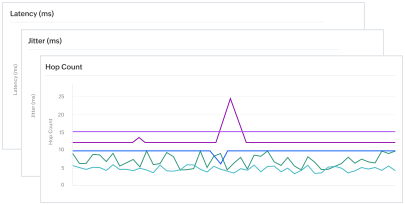
ISP monitoring tool showing latency metrics

Identify high-latency paths across your ISP network

Run traceroutes from 130+ monitoring locations worldwide and compare latency across every network path. Site24x7 highlights exactly which hop or interface introduces the most delay, so you can isolate ISP-related bottlenecks from infrastructure issues. A global latency heat map gives you an at-a-glance view of connection quality across all your monitored regions.

Verify ISP SLA compliance with real performance data

Collect continuous measurements of availability, round-trip latency, hop count, AS number, and jitter for every network path. Compare these metrics against your ISP's committed SLA thresholds to build an evidence-backed case when performance falls short. Site24x7 also detects uninformed route changes and transit provider switches, giving you immediate visibility into network path alterations that could affect performance.

ISP performance monitoring with SLA verification
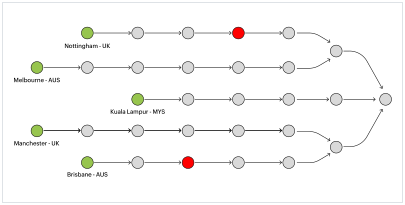
ISP latency monitoring hop-to-hop analysis

Analyze hop-to-hop data transfer in detail

See exactly how your data moves through each network node. Site24x7's hop-to-hop view reveals latency, connectivity provider changes, IP prefix details, AS number, and AS name at every point along the route. When checked from different vantage points, you can spot asymmetric routing, identify broken links, and determine whether a specific ISP or transit provider is the source of degradation.

Monitor ISP connectivity across ICMP, TCP, and UDP protocols

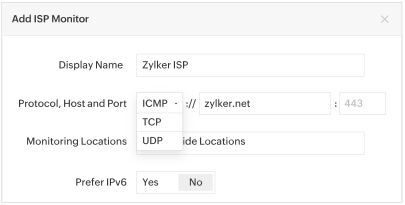
Test domain reachability using all three major transport protocols. Internet Control Message Protocol (ICMP) gives you basic connectivity and round-trip time data, Transmission Control Protocol (TCP) validates application-layer reachability on specific ports, and User Datagram Protocol (UDP) helps you assess performance for latency-sensitive services like VoIP and video streaming. Select the protocol, specify the host and port, and start monitoring in seconds.

ISP network monitoring with multiple protocol support
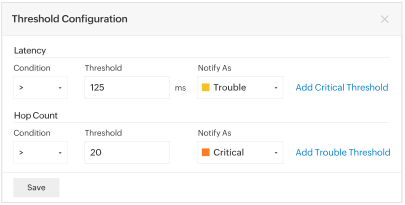
ISP monitoring threshold alerts

Set granular thresholds and alerts at each hop

Define threshold limits for every metric you track—latency, jitter, AS number on the traceroute, and the AS number of the last hop. If an untrusted ISP or transit provider begins handling your traffic at any point along the route, you receive an instant alert so you can take corrective action. Thresholds can be configured globally or customized per monitoring location to match regional SLA requirements.

Get proactive alerts for ISP outages and degradation

Site24x7 notifies you the moment ISP performance crosses your defined thresholds. Alerts are delivered through email, SMS, voice calls, or integrations with tools like Slack, Microsoft Teams, PagerDuty, and ServiceNow. With root cause analysis built into every alert, your team spends less time diagnosing and more time resolving—or escalating to the responsible ISP with concrete data.

Frequently asked questions about ISP monitoring

What is ISP monitoring?

ISP monitoring is the practice of continuously tracking the performance, availability, and reliability of your internet service providers. It involves measuring key network metrics—such as latency, jitter, packet loss, and hop count—along the data path from your infrastructure to your end users. The goal is to ensure that ISPs are delivering the connectivity they promised in their service level agreements and to quickly identify when an ISP is the root cause of performance issues.

Why do I need an ISP monitoring tool?

Without an ISP monitoring tool, distinguishing between problems in your own infrastructure and issues caused by your ISP or transit providers is difficult. An ISP monitoring tool provides hop-by-hop visibility into the network path, measures real-time performance metrics from multiple locations, and generates alerts when SLA thresholds are breached. This data helps you prove ISP accountability, troubleshoot outages faster, and make informed decisions about switching or adding providers.

What metrics should I track for ISP performance?

The core metrics for ISP monitoring include latency (round-trip time for data to travel between two points), jitter (variation in latency over time), packet loss (percentage of data packets that fail to reach their destination), hop count (number of network nodes data passes through), and availability (uptime percentage). Tracking autonomous system (AS) numbers and route changes is also valuable for detecting unauthorized path modifications by ISPs.

How does Site24x7 monitor ISP performance from multiple locations?

Site24x7 runs traceroutes from over 130 monitoring locations across the globe. Each location independently traces the network path to your target host, measuring latency, jitter, and packet loss at every hop. This multi-location approach reveals whether performance issues are region-specific or widespread, and helps you identify exactly which ISP or transit provider is responsible for degradation in a particular geography.

Can ISP monitoring help with SLA verification?

Yes. ISP monitoring provides the continuous, objective data needed to verify whether your ISP is meeting its SLA commitments. Site24x7 tracks availability, latency, and other performance metrics 24/7, stores historical data for trend analysis, and generates reports you can use when negotiating with ISPs or filing SLA breach claims. Threshold-based alerts notify you in real time when agreed-upon performance levels are not being met.

Start monitoring your ISP performance today

Start 30-day free trial Try now, sign up in 30 seconds
Looking for assistance? We’re here to help!

Want to learn more?

  • Personalized product demo
  • Proof of concept for set up
  • 30-day, unlimited, free trial
Request a Demo

Interested in our services?

  • 24/5 customer support
  • Flexible and competitive pricing
  • Better ROI
Get quote